---
title: Overview of the Employee Department Calendar
description: Take control of your department's schedules with the Employee Department Calendar. Access shift types, weekly schedules, and labor budgets all in one place
---
[Skip to content](https://support.makeshift.ca/overview-of-the-employee-department-calendar#main-content)
[Customer portal](https://support.makeshift.ca/ticketportal?hsLang=en-ca)
[](https://support.makeshift.ca/?hsLang=en-ca)
- [Back to MakeShift](https://makeshift.ca/)
- +1-587-390-2068
- [Sign In](https://app.makeshift.ca/)
Open main navigation
Close main navigation
- [Back to MakeShift](https://makeshift.ca/)
- +1-587-390-2068
- [Sign In](https://app.makeshift.ca/)
- [Customer portal](https://support.makeshift.ca/ticketportal)
- [Submit a ticket](https://support.makeshift.ca/submit-a-request-for-support)
[Submit a ticket](https://support.makeshift.ca/submit-a-request-for-support?hsLang=en-ca)
What can we help you with?
- There are no suggestions because the search field is empty.
1. [MakeShift Support](https://support.makeshift.ca/?hsLang=en-ca)
2. [Admins/Managers](https://support.makeshift.ca/admins-managers?hsLang=en-ca)
3. [The Schedule](https://support.makeshift.ca/admins-managers?hsLang=en-ca#the-schedule)
# Overview of the Employee Department Calendar
Department calendars allow administrators to view their department schedules on a week-by-week basis. They can see who is working, who is available see who has scheduled time off. Shifts can be quickly scheduled, or available shift notifications sent out. The schedule can be filtered by position, employment type or employee name.
To get to the **Department Calendar**, click the **Schedules** link in the top navigation bar.

Then click on the department's name.

On the department calendar page you will be able to see the department's shift types, the department's weekly schedule and the weekly schedule of all employees within that department. You will also see a labour budget bar at the top of the schedule to let you know how your actual weekly budget is comparing to your estimated weekly budget.
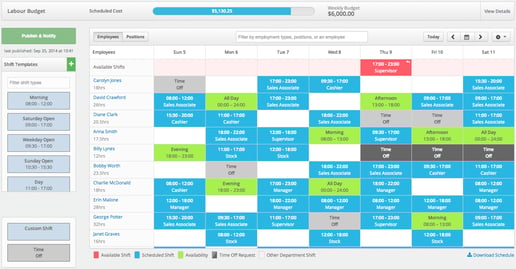
- All **Scheduled Shifts** will appear in **Blue**
- All scheduled or approved **Time Off **will appear in **Light Grey**
- All requested or pending **Time Off** will appear in **Dark Grey**
- All **Availability** as set by employees will appear in **Green**
- Any **Available Shifts **will appear in **Red** in the top row of the department calendar
- Any **Other Department Shifts** will appear in **White**
To **Add a Shift** to the department calendar, click and hold on the desired **Shift Type **and **drag **the box to the desired employee and day. Then release your mouse button. A blue shift will now appear on the calendar.
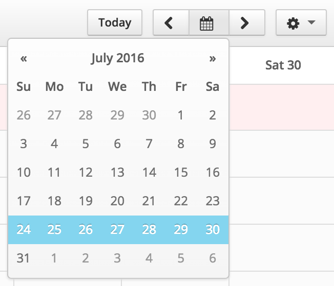
To move between weeks click the **Left **and **Right** arrows. To jump ahead or to select a specific week, click the **Small Calendar** icon button then select your desired week from the drop down tool.
You can filter employees by **Employment Types,** **Positions, Skills**or **Name** by typing in the desired filter in the field at the top of the department calendar.

- [Getting Started](https://support.makeshift.ca/getting-started-guides?hsLang=en-ca#main-content)
- [Printable Guides (PDF)](https://support.makeshift.ca/getting-started-guides?hsLang=en-ca#printable-guides-pdf)
- [General](https://support.makeshift.ca/general?hsLang=en-ca#main-content)
- [FAQ](https://support.makeshift.ca/general?hsLang=en-ca#faq)
- [Admins/Managers](https://support.makeshift.ca/admins-managers?hsLang=en-ca#main-content)
- [Account Details](https://support.makeshift.ca/admins-managers?hsLang=en-ca#account-details)
- [Company Account Settings](https://support.makeshift.ca/admins-managers?hsLang=en-ca#company-account-settings)
- [The Schedule](https://support.makeshift.ca/admins-managers?hsLang=en-ca#the-schedule)
- [Locations and Departments](https://support.makeshift.ca/admins-managers?hsLang=en-ca#locations-and-departments)
- [Employees](https://support.makeshift.ca/admins-managers?hsLang=en-ca#employees)
- [Analytics](https://support.makeshift.ca/admins-managers?hsLang=en-ca#analytics)
- [Time & Attendance](https://support.makeshift.ca/admins-managers?hsLang=en-ca#time-attendance)
- [MakeShift Live for iOS](https://support.makeshift.ca/admins-managers?hsLang=en-ca#makeshift-live-for-ios)
- [MakeShift Live for Android](https://support.makeshift.ca/admins-managers?hsLang=en-ca#makeshift-live-for-android)
- [ADP Client Resources](https://support.makeshift.ca/admins-managers?hsLang=en-ca#adp-client-resources)
- [BambooHR Client Resources](https://support.makeshift.ca/admins-managers?hsLang=en-ca#bamboohr-client-resources)
- [Quickbooks Time Client Resources](https://support.makeshift.ca/admins-managers?hsLang=en-ca#quickbooks-time-client-resources)
- [New MakeShift](https://support.makeshift.ca/admins-managers?hsLang=en-ca#new-makeshift)
- [Users/Employees](https://support.makeshift.ca/users-employees?hsLang=en-ca#main-content)
- [Android](https://support.makeshift.ca/users-employees?hsLang=en-ca#android)
- [iOS](https://support.makeshift.ca/users-employees?hsLang=en-ca#ios)
- [Web](https://support.makeshift.ca/users-employees?hsLang=en-ca#web)
- [Users/Employees FAQ](https://support.makeshift.ca/users-employees?hsLang=en-ca#users-employees-faq)
- [Video Tutorials](https://support.makeshift.ca/video-tutorials?hsLang=en-ca)
- [Apps](https://support.makeshift.ca/apps?hsLang=en-ca#main-content)
- [MakeShift Admin/Managers](https://support.makeshift.ca/apps?hsLang=en-ca#makeshift-admin-managers)
- [MakeShift Employees](https://support.makeshift.ca/apps?hsLang=en-ca#makeshift-employees)
- [Admins/Managers (BETA)](https://support.makeshift.ca/admins-managers-beta?hsLang=en-ca#main-content)
- [Location and Departments (BETA)](https://support.makeshift.ca/admins-managers-beta?hsLang=en-ca#location-and-departments-beta)
- [Employees (BETA)](https://support.makeshift.ca/admins-managers-beta?hsLang=en-ca#employees-beta)
- [The Schedule (BETA)](https://support.makeshift.ca/admins-managers-beta?hsLang=en-ca#the-schedule-beta)
- [Account Details (BETA)](https://support.makeshift.ca/admins-managers-beta?hsLang=en-ca#account-details-beta)
- [Contact Support](https://support.makeshift.ca/contact-support-now?hsLang=en-ca)
- [Enterprise](https://support.makeshift.ca/enterprise?hsLang=en-ca#main-content)
- [Time & Attendance for Enterprise Clients](https://support.makeshift.ca/enterprise?hsLang=en-ca#time-attendance-for-enterprise-clients)
[](https://makeshift.ca/)
Copyright ⓒ 2024 MakeShift | [Privacy Policy](https://makeshift.ca/privacy) | [Terms of Use](https://makeshift.ca/terms)
[mailto:email@email.com](mailto:email@email.com)